
LEM module#
speakerSim#
In electroacPy, all speaker-related classes are grouped within the speakerSim submodule:
electroAcousticDriver: basic class to store driver parameters and plot related impedance and mechanical behavior — where functions like
.plotZe()and.plotXVA()are defined. These objects are stored in the.driver[]dictionary of loudspeaker systems,speakerBox: class to create enclosures based on given dimensions. Can be associated to drivers to estimate related velocities. speakerBox are saved in the
.enclosure[]dictionary.xovers: filtering functions applied to radiated pressure. Stored in the
.network[]dictionary.
electroAcousticDriver#
When creating a driver object, the circuit shown in Fig. 90 is used to compute its free-air electrical impedance from electrical and mechanical behavior[1]. The object itself receives the EAC identifier for the loudspeakerSystem class.

Fig. 90 Lumped Element Model used in electroAcousticDriver.#
From this initial circuit we get
with \(Z_e\) the coil impedance expressed as
and \(Z_{ms}\) the mechanical impedance of moving parts:
A good thing to note is that .plotZe() will actually plot the input impedance \(Z_{in}\) and not the coil impedance \(Z_e\).
speakerBox#
As explained in the lumped-element modeler for enclosures, all speakerBox objects are primarily defined by their respective box volumes. Then, depending on user inputs, different types of systems can be created. This section illustrates the various lumped networks for each enclosure design and clarifies which parameters correspond to specific elements of the system.
The alignments given in the following of this section are based on the Wavecor WF275BD01 mid-bass driver. These are computed following the monopole equation — mounted in an infinite baffle:
where \(Q\) is the volume velocity of radiating components and \(r=1\) m, the distance from the source to evaluation point.
sealed enclosure#
The sealed box is the default configuration. In this case, the back of the driver is loaded by a simple acoustic volume.
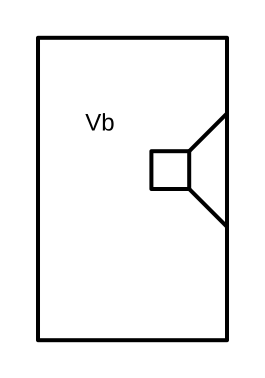
Fig. 91 Physical representation of the sealed box.#
system.lem_enclosure("sealed", Vb=20e-3, setDriver="wf250") # volume in m^3
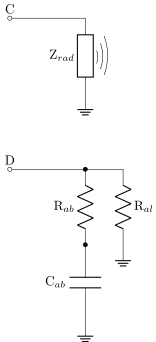
Fig. 92 Acoustic network of a sealed enclosure. Connector C is linked to the front radiation impedance, while D is connected to the back radiation of the driver.#
This acoustic volume is represented as a capacitance \(C_{ab}\), coupled with two resistances, \(R_{ab}\) and \(R_{al}\), which account for damping within the enclosure and acoustic leakage, respectively. These elements are defined as:
with:
\(V_b\) the enclosure volume,
\(rho\), \(c\) the air density and speed of sound,
\(f_c\) the resonance frequency of the driver inside the enclosure,
\(Q_{ab}\) the quality factor linked to acoustic losses in the enclosure,
\(Q_{al}\) the quality factor linked to acoustic leakage out of the enclosure.
By default in the .lem_enclosure() method, the Q factors are set to be Qab=120 and Qal=30. These values usually sits between:
where lower values on the left indicate higher losses, while higher values on the right correspond to lower losses. Of course, these values depend heavily on the amount of damping material in the enclosure and the quality of construction. You will surely need to determine the “correct” values through trial and error, depending on your builds.
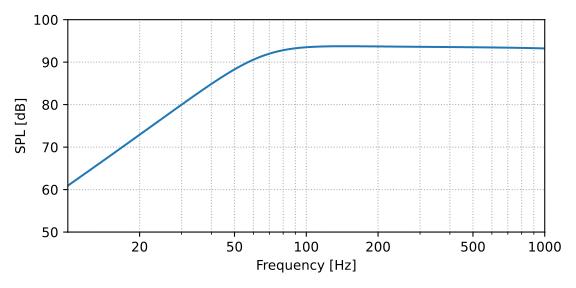
Fig. 93 Example a sealed box loudspeaker alignment.#
ported enclosure#
Ported enclosures[2] are defined by adding — to the .lem_enclosure() method — a port’s length \(L_p\) and a corresponding radius or cross-section area: \(r_p\) or \(S_p\), respectively. Since ports are more than just straight tubes, it is possible to specify whether none, one, or both ends are flanged. This can be adjusted by setting the flange argument to either "none", "single" or "both". The following code shows the basics arguments for defining a ported box:
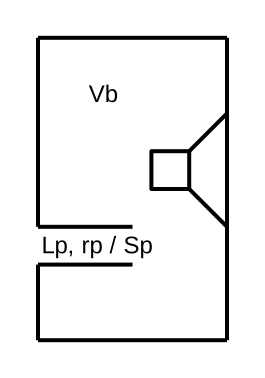
Fig. 94 Representation of a bass-reflex system with a port at the back of the enclosure.#
system.lem_enclosure("port", Vb=20e-3, Lp=30e-2, rp=5e-2,        # length in m
                             flange="single", setDriver="wf250")
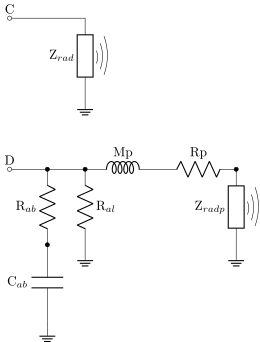
Fig. 95 Ported enclosure. The port radiation is modeled with an additional radiation impedance.#
Relative to the acoustic network, a ported enclosure adds an acoustic mass and resistance linked to the port dimensions and another radiation impedance \(Z_{radp}\) linked to the area of the opening. These are defined as:
where
\(\rho\) is the air density,
\(Lp\), \(rp\) and \(Sp\) are the length, radius and cross-sectional area of the port,
\(\sigma\) is the flange coefficient: 0.96 for both ends flanged, 0.84 for one flanged end, and 0.72 for both ends unflanged,
\(\omega\) is the angular frequency,
\(\mu\) is the air viscosity (approximately \(1.82\times 10^{-5}\) kg/(m.s) at 20°C).
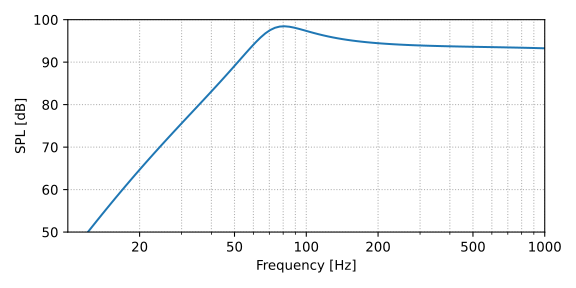
Fig. 96 Example of bass-reflex alignment.#
ABR configuration#
The ABR (or passive radiator) setup is really similar to the ported enclosure. The only difference is that it replaces the port (acoustic mass and resistance) by a membrane. Hence, the ABR is expressed as mechanical mass, resistance and compliance (Mmd, Rmd, Cmd and associated radiating surface Sd) — similar to what is found in the mechanical circuit of a electro-dynamic loudspeaker.
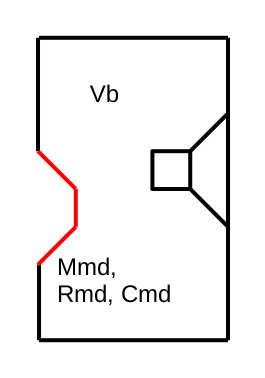
Fig. 97 ABR setup, with the auxiliary radiator represented in red.#
system.lem_enclosure("abr", Vb=20e-3, Mmd=190e-3, Cmd=0.35e-3,
                            Rmd=0.368, Sd=314e-4, setDriver="wf250")
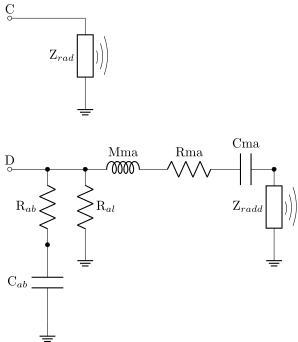
Fig. 98 ABR enclosure. Here, the port is replaced by a mechanical radiator expressed in the acoustic domain.#
These mechanical parameters are given by:
where \(Mmd\) is the mass of the passive radiator in \(kg\), \(Rmd\) the mechanical resistance of suspensions in \(N.s/m\) and Cmd is the suspensions compliance in \(m/N\). Finally, \(Sd\) is the radiating surface of the ABR, which is used to translate the mechanical elements into their acoustical counterparts.
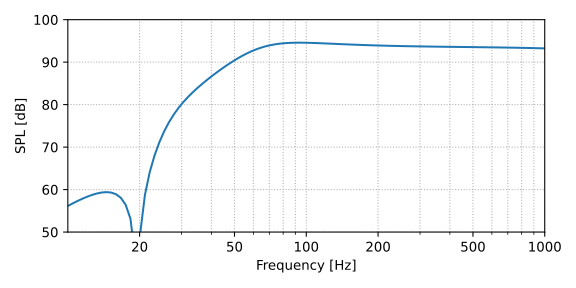
Fig. 99 Example of ABR alignment.#
4th order bandpass (port / ABR)#
The 4th order bandpass enclosure has its loudspeaker radiating into a front volume \(V_f\). In that configuration, the port (or ABR) is the only radiating element of the system — connected to the front volume. Similarly to bass-reflex or ABR enclosures, the port dimensions or ABR parameters must be given as key arguments.
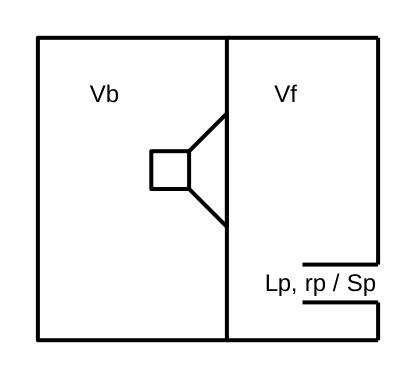
Fig. 100 Ported bandpass enclosure.#
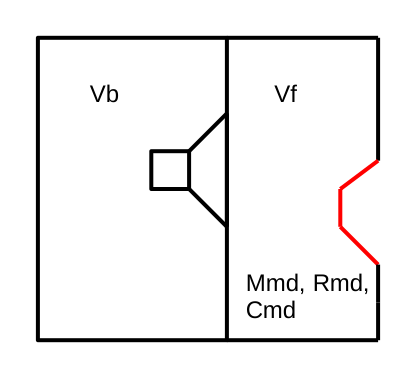
Fig. 101 ABR bandpass enclosure.#
system.lem_enclosure("bp_port", Vb=20e-3, Vf=15e-3,
                                Lp=35e-2, rp=5e-2, setDriver="wf250")
system.lem_enclosure("bp_abr", Vb, Vf, Mmd, Cmd, Rmd, Sd)
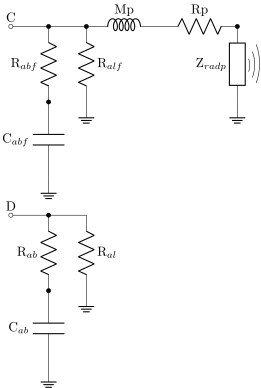
Fig. 102 4th order bandpass enclosure. The port is in the volume in front of the woofer.#
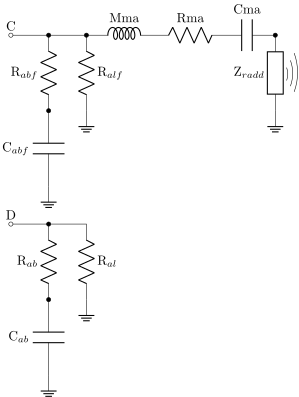
Fig. 103 4th order bandpass enclosure. A passive radiator replaces the port.#
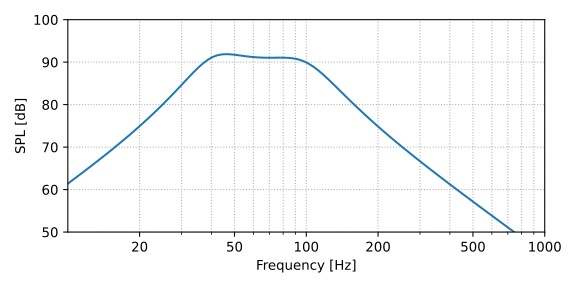
Fig. 104 Example of a 4th order bandpass alignment. In this case, the front volume is loaded by a port.#
6th order bandpass (port / ABR)#
These configurations are achieved by setting an additional port / ABR into the .lem_enclosure() method. It will be connected to the back volume Vb of the driver.
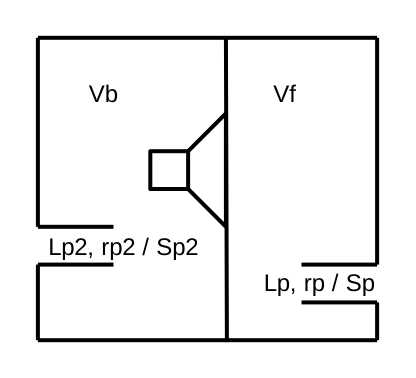
Fig. 105 6th order bandpass — port.#
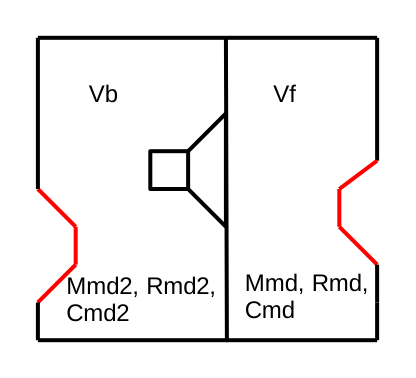
Fig. 106 6th order bandpass — ABR.#
system.lem_enclosure("bp_port", Vb=50e-3, Vf=18e-3, Lp=35e-2, rp=5e-2,
                                Lp2=25e-2, rp2=2.5e-2, setDriver="wf250")
system.lem_enclosure("bp_abr", Vb, Vf, Mmd, Cmd, Rmd, Sd,
                                       Mmd2, Cmd2, Rmd2, Sd2)
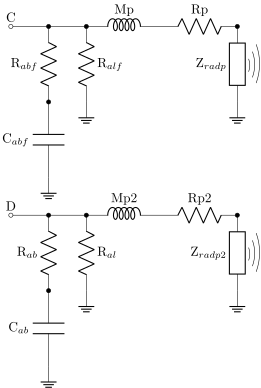
Fig. 107 6th order bandpass — port.#
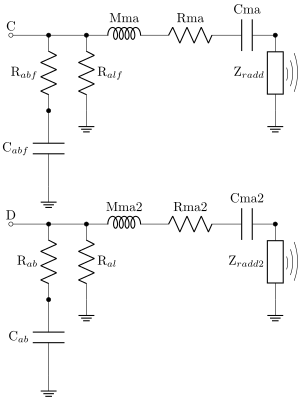
Fig. 108 6th order bandpass — ABR.#
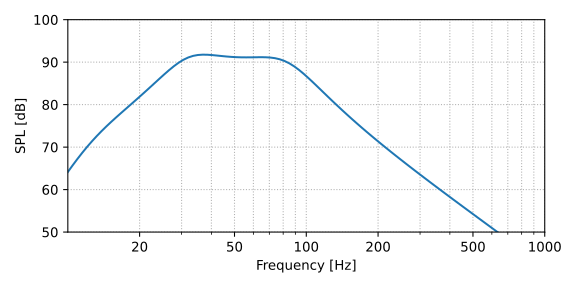
Fig. 109 Example of a 6th order bandpass alignment. Port configuration.#