Point source#
Acoustic monopoles are the simplest type of sound sources. They can be seen as single points in space, radiating sound waves in all directions. The mathematical expression of a monopole in the frequency domain can be written as follow:
where \(r\) is the distance from the monopole, \(k=\frac{2\pi f}{c}\) the wavenumber, \(\rho\) the density of propagation medium, \(c\) the speed of sound in said medium, and \(Q\) the volume velocity. Using a point source is practical when solving problems that are not specifically source related, such as the acoustic of a room.
Implementation#
Monopole studies use the following syntax:
system.study_acousticPointSource("monopole",         # reference
                                 monopolePosition,   # list or numpy array
                                 acoustic_radiator,  # driver / enclosure objects
                                 meshPath=path,      # optional boundary mesh
                                 domain="interior")  # domain of simulation
where:
monopolePositioncan either be a numpy array of size(nSource, 3), or a vector of vectors (e.g.[[x1, y1, z1], [x2, y2, z2], ..., [xN, yN, zN]]),acoustic_radiatoris defined in the same way as for.study_acousticBEM(). References to BEM need to be set even-though no mesh surface is radiating. Hence,ref2bemcan be given arbitrarily,meshPathis optional: point source studies can be set with or without physical boundaries,domainis set to"exterior"or"interior", similarly to.study_acousticBEM().
Practical example#
Let’s take a room of dimensions \(L_x=3.15\) m, \(L_y=5\) m and \(L_z=2.3\) m. We set a single point source in a corner, and evaluation point in the opposite position. In that case, we consider the walls to be fully reflective.
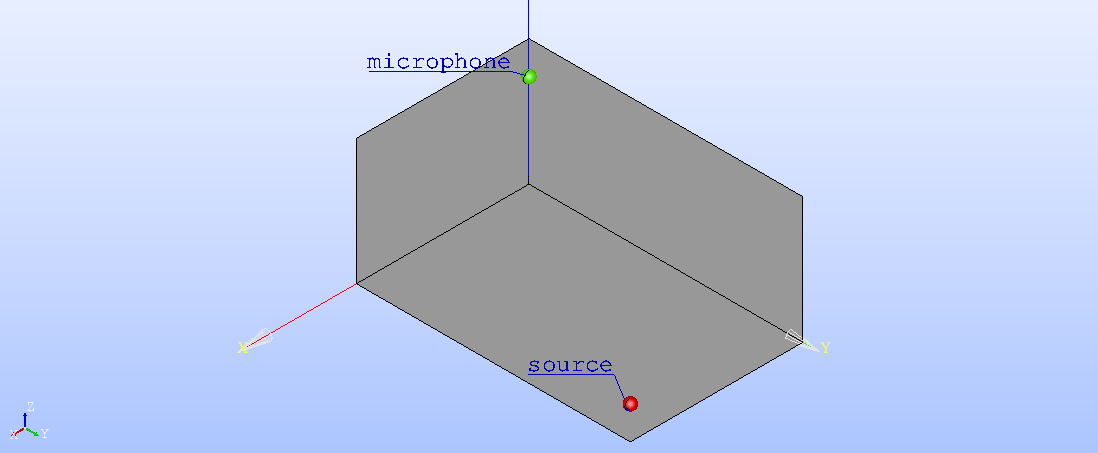
Fig. 28 Shoebox room, visualization done in Salome.#
As usual, we start by importing libraries, setting the mesh path and initializing the system object:
import numpy as np
import electroacPy as ep
from electroacPy import gtb

#%% mesh data
room_mesh = "../geo/mesh/room.med"

#%% system initialization
frequency = np.arange(10, 200.25, 0.25)
sim = ep.loudspeakerSystem(frequency)
Now, the position of sources and evaluation points are written as vectors. The source has a unit velocity. In that case, ref2bem is set to 10 — even-though this value is not “used” directly as a reference to a mesh surface, the post-processing function will use it.
#%% source and microphone position
xSce = [2.85, 4.7, 0.3]
xMic_1 = [0.3, 0.3, 2]
sim.lem_velocity("source", ref2bem=10)
Then, we create the study, add an evaluation and run simulations.
#%% study creation
sim.study_acousticPointSource("room", [xSce], "source",
                              meshPath=room_mesh, domain="interior")
sim.evaluation_fieldPoint("room", "corner_mic", [xMic_1])

#%% run
sim.run()
The acoustic pressure at the corner microphone — displayed in Fig. 29 — can be extracted as follow:
#%% extract data and plot
mic = sim.get_pMic("room", "corner_mic")
gtb.plot.FRF(frequency, mic, logx=False, xlim=(20, 200))
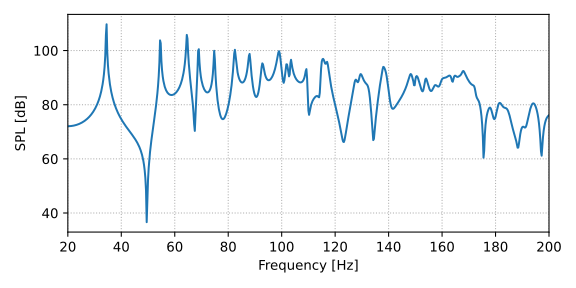
Fig. 29 Corner microphone pressure.#
We can also compare the BEM simulation with the analytical solution of modes in a shoebox room:
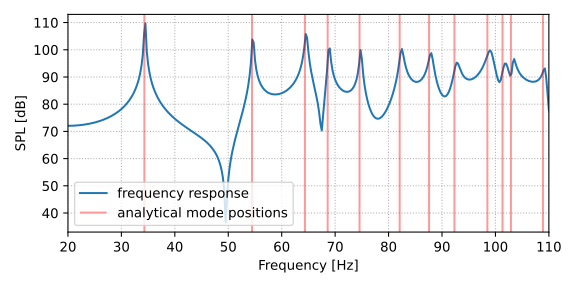
Fig. 30 Comparison between PSM/BEM acoustic pressure and analytical solution of room modes.#
Finally, using sim.plot_pressureMesh("room") we display the pressure over the mesh:
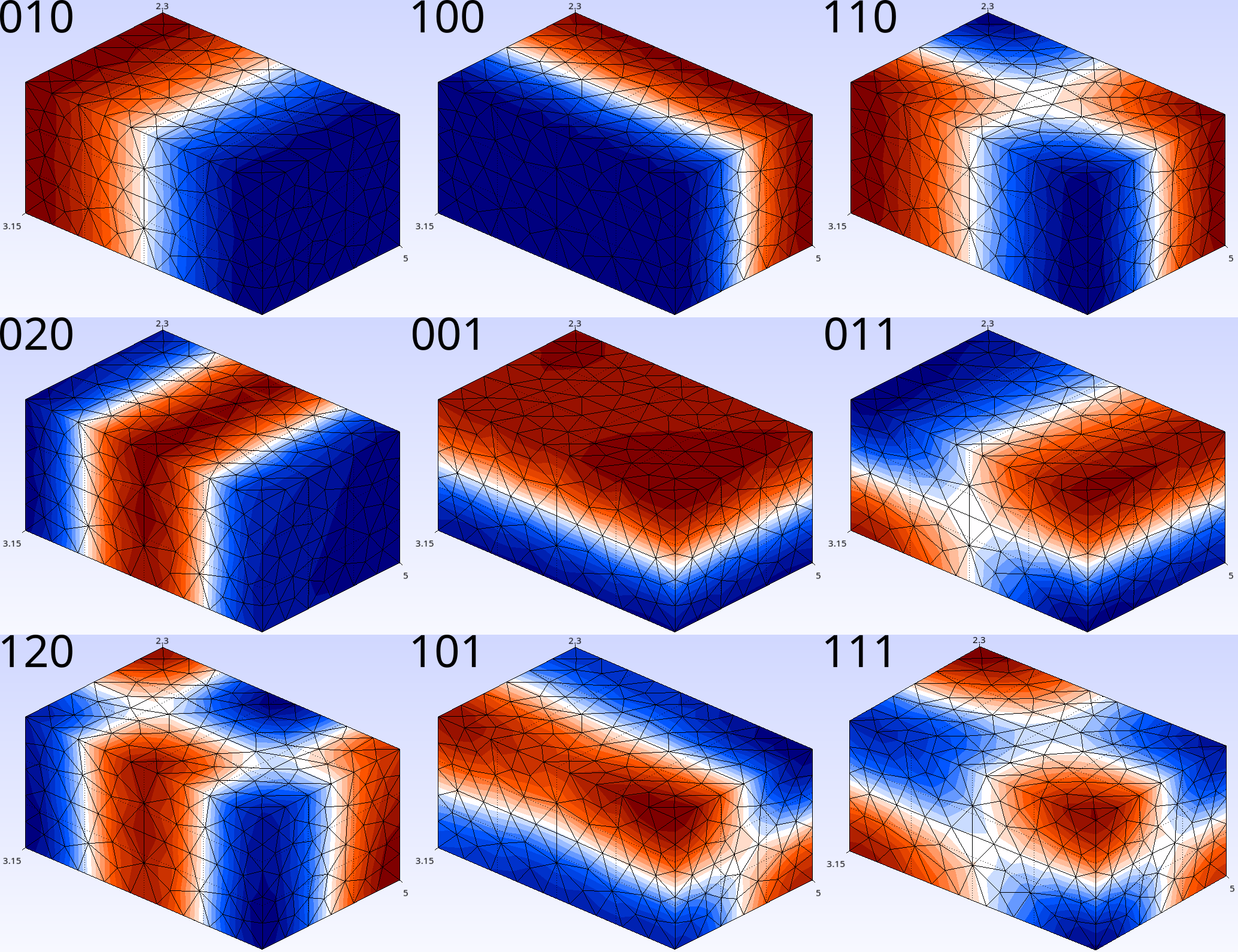
Fig. 31 Some room modes.#