Lumped Element Modeler#
ElectroacPy lumped modeler allows the simulation of loudspeaker drivers in enclosures. All velocities computed — from driver membrane to port particle velocity — can then be set as input surface-velocity in the BEM modeler. This chapter explains how to create and add drivers and enclosures to a loudspeakerSystem.
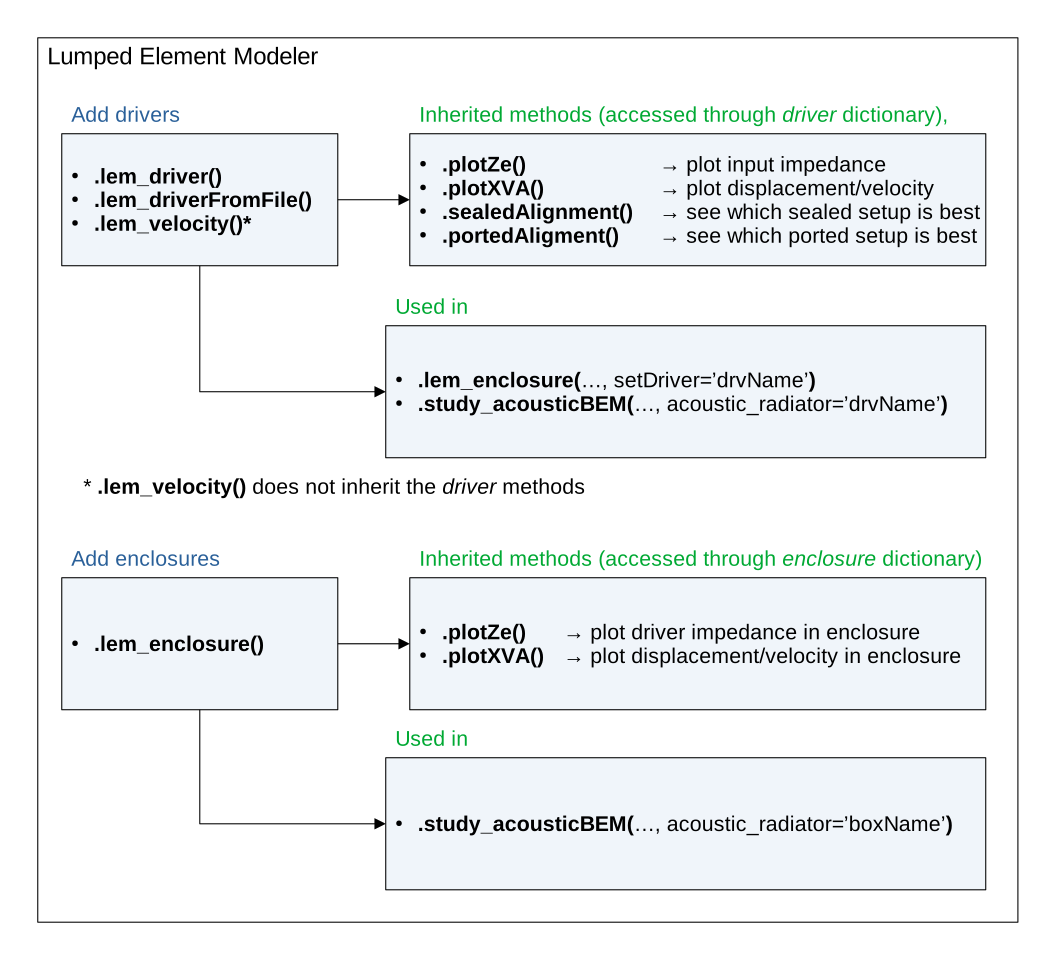
Fig. 8 Lumped-Modeler structure.#
.driver[]#
Loudspeaker drivers are characterized by their Thiele/Small parameters. When creating a driver, it is possible to “manually” define its lumped parameters, or to load a file containing the relevant information:
.lem_driver(),.lem_driverImport().
import electroacPy as ep
import numpy as np

#%% frequency axis and system initialization
frequency = np.arange(10, 10000, 1)
system = ep.loudspeakerSystem(frequency)

#%% Woofer import
Re = 6.2        # Ohm
Le = 1.2e-3     # H
Bl = 16         # T.m
Mms = 84.9e-3   # kg
Cms = 560e-6    # m/N
Rms = 2.35      # kg/s
Sd = 508e-4     # m^2
system.lem_driver("SB34", 1, Le, Re, Cms, Mms, Rms, Bl, Sd)

#%% Midrange import
system.lem_driverImport("MR16", "../technical_data/SB MR16PNW-8.txt")

#%% Tweeter import (through T/S file)
system.lem_driverImport("TW29", "../technical_data/TW29RN-B.txt")
For now, electroacPy supports the following file format:
.txt, (both Klippel and HornResp),
.bastaelement (Basta),
.wdr (WinISD),
.sdrv (speakerSim),
.qsp (Qspeaker).
Once parameters are loaded in a driver, it is possible to plot its electrical impedance and mechanical behavior using .plotZe() and .plotXVA(). To access these functions, the object is called from its .driver[] dictionary. Resulting plot are shown in Fig. 9 and Fig. 10.
system.driver["SB34"].plotZe()
system.driver["SB34"].plotXVA()
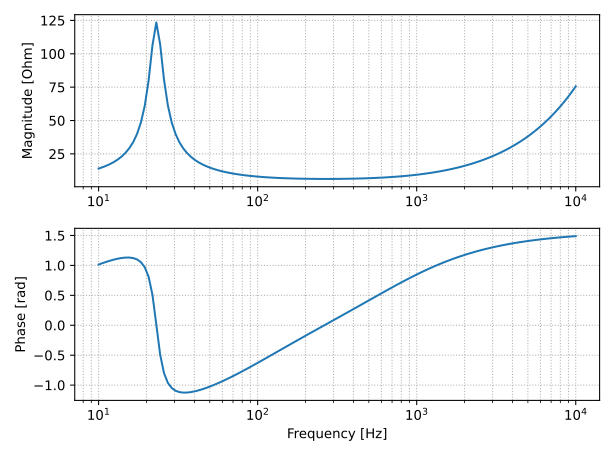
Fig. 9 Electrical impedance of the SB34 subwoofer in free-air.#
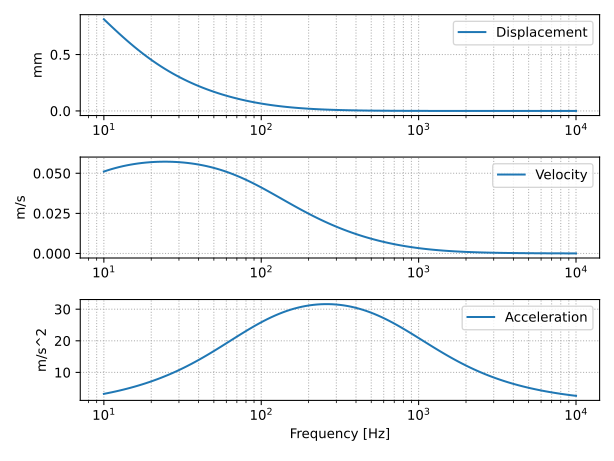
Fig. 10 Displacement, velocity and acceleration of the SB34 subwoofer in free-air.#
Before working with enclosures, two small methods are available: .sealedAlignment() and .portedAlignment(). These open a simple Tkinter window[1] with text-boxes allowing to change enclosure configuration. Useful to find “correct” acoustic alignment before adding enclosures to the system.
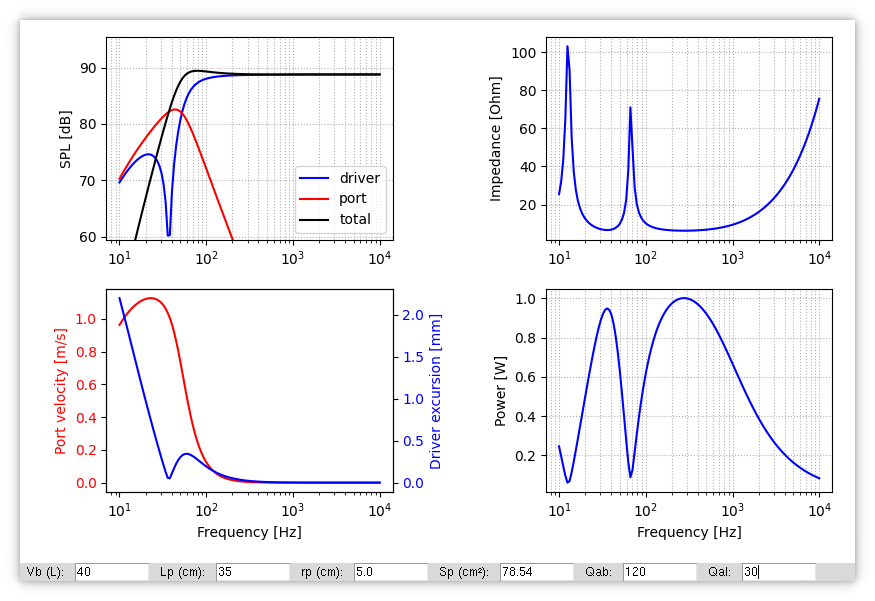
Fig. 11 Ported alignment tool.#
.enclosure[]#
The .lem_enclosure() method offers seven types of pre-defined cabinets. Each depend on the **kwargs called when creating an enclosure. When calling the acoustic volume Vb alone, the default enclosure is sealed. The following table shows how to get each pre-defined setups.
Configuration |
Inputs |
unit |
meaning |
|---|---|---|---|
Sealed |
Vb |
m\(^3\) |
cabinet volume |
Ported |
Lp |
m |
port length |
ABR (passive radiator) |
Mmd |
kg |
moving mass |
Bandpass (port) - 4\(^{th}\) order |
Vf |
m\(^3\) |
front volume |
Bandpass (passive radiator) - 4\(^{th}\) order |
Vf |
m\(^3\) |
front volume |
Bandpass (port) - 6\(^{th}\) order |
Vf |
m\(^3\) |
front volume |
Bandpass (ABR) - 6\(^{th}\) order |
Vf |
m\(^3\) |
front volume |
In our example, we create a ported woofer and a sealed midrange. Again, .plotZe() and .plotXVA() display general characteristics of our system — see Fig. 12 and Fig. 13.
system.lem_enclosure("ported_LF", 40e-3,
                     Lp=35e-2, Sp=78.6e-4,
                     Qab=120, Qal=30,
                     ref2bem=[1, 2],
                     setDriver="SB34", Nd=1,
                     wiring="parallel")

system.lem_enclosure("sealed_MF", 5.1e-3,
                     ref2bem=3, setDriver="MR16")

#%% plot data
system.enclosure["ported_LF"].plotZe()
system.enclosure["ported_LF"].plotXVA()
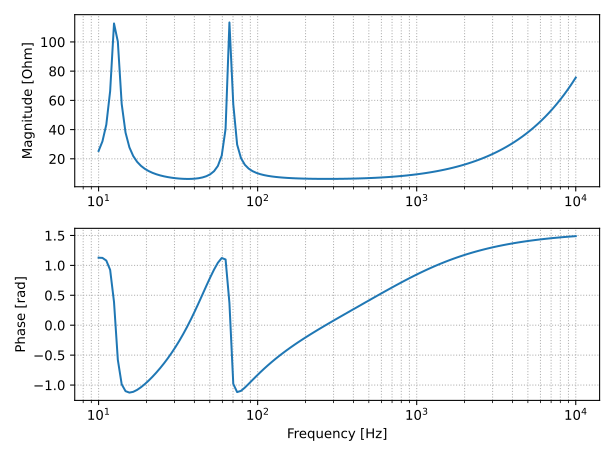
Fig. 12 Electrical impedance of the SB34 woofer in its ported enclosure.#
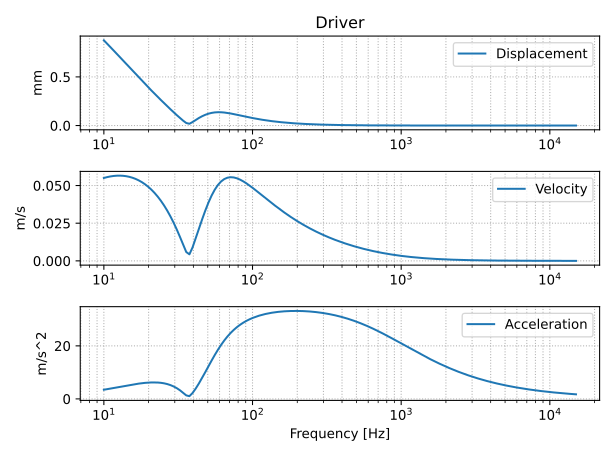
Fig. 13 SB34 displacement, velocity and acceleration in its ported enclosure.#
A few notes about the previous enclosure definition:
Qabis the quality factor linked to acoustic losses inside the enclosure, generally30<Qab<120,Qalis the quality factor of acoustic leakage, generally10<Qal<30,ref2bemallows to link velocities to radiating surfaces in the BEM simulations. Port and passive radiator should always be defined as the last item,setDrivertakes the corresponding driver (from.driver[]) and compute its velocity inside the enclosure,Ndrepresent the number of drivers to set in the enclosure,wiringis the driver configuration, it defaults to"parallel",the tweeter is not set in an enclosure as we assume that its acoustic load is already accounted for in its lumped parameters (which is not a generality).
Code summary#
The following snippet is a summary of what has been discussed above. Four modifications are done:
frequencyis defined with 125 points (instead of \(10^4\)), to reduce computation time,the subwoofer is imported from a file,
BEM reference added to the tweeter driver,
ep.save()is used to store the current system state in numpy archives (.npz).
import electroacPy as ep
from electroacPy import gtb

#%% frequency axis and system initialization
frequency = gtb.freqop.freq_log10(1, 10e3, 125)
system = ep.loudspeakerSystem(frequency)

#%% Load drivers
system.lem_driverImport("SB34", "../technical_data/SB SB34NRXL75-8.txt")
system.lem_driverImport("MR16", "../technical_data/SB MR16PNW-8.txt")
system.lem_driverImport("TW29", "../technical_data/TW29RN-B.txt", ref2bem=4)

#%% Define ported enclosure
system.lem_enclosure("ported_LF", 40e-3,
                     Lp=35e-2, Sp=78.6e-4,
                     Qab=120, Qal=30,
                     ref2bem=[1, 2],
                     setDriver="SB34", Nd=1,
                     wiring="parallel")

system.lem_enclosure("sealed_MF", 5.1e-3,
                     ref2bem=3, setDriver="MR16")

#%% save state
ep.save("03_LEM_Recap", system)