circuitSolver#
Before diving into the lumped-element wrappers, it is best to present the circuitSolver class. It lets the user create electrical networks and uses (a fairly simplified) Modified Nodal Analysis (MNA) to solve nodes potential and sources current in the frequency domain. It is the basis on which electroacPy’s lumped-element classes are built. Using networks through circuitSolver allows much more flexibility when describing electro-acoustic networks — as long as you know how to describe your system with lumped-elements.
Networks are initialized by creating a circuit object:
import numpy as np
from circuitSolver.solver import circuit

frequency = np.arange(10, 10000, 1) # frequency axis
network   = circuit(frequency)      # circuit object
Five methods are then available to the user:
.addComponent(), add one or several 2-port elements,.addBlock(), add one or several multi-port elements,.run(), solve the circuit.getPotential(), extract potential at given node,.getFlow(), extract current of given source.
For those interested in MNA, QUCS documentation does a really good job explaining its functioning.
Components#
electric#
The five basic electrical components are given in Fig. 65 and Fig. 66. These are defined by their positive and negative nodes (np and nm, respectively) and associated value in either Volt, Ampere, Ohm, Henry or Farad.
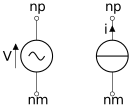
Fig. 65 voltageSource(np, nm, value) and currentSource(np, nm, value).#
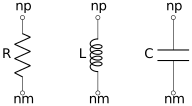
Fig. 66 From left to right: resistance(np, nm, value=Ohm), inductance(np, nm, value=H), capacitance(np, nm, value=F).#
The code below shows how to create a 2nd order lowpass filter. Resulting transfer function is shown in Figure Fig. 67.
# here, we use the previous network object
from numpy import pi, arange
from electroacPy import csc       # circuitSolver.components
from electroacPy import circuit

frequency = arange(10, 10e3, 1)
LP = circuit(frequency)

#%% Definition of components and cut-off frequency
# Low pass for a loudspeaker with nominal impedance of 8 Ohm
f0 = 1000
w0 = 2*pi*f0
Re = 8
L  = Re / w0
C  = 1 / w0 / Re

#%% Create network
Vs = csc.electric.voltageSource(1, 0, 2.83)
L1 = csc.electric.inductance(1, 2, 2*L)
C1 = csc.electric.capacitance(2, 0, 0.5*C)
R  = csc.electric.resistance(2, 0, Re)

LP.addComponent(Vs, L1, C1, R)
LP.run()

#%% Plot data
H = LP.getPotential(2) / LP.getPotential(1)

gtb.plot.FRF(frequency, H, "dB", ylim=(-20, 3),
             title="Transfer function",
             ylabel="P_out / P_in [dB]")
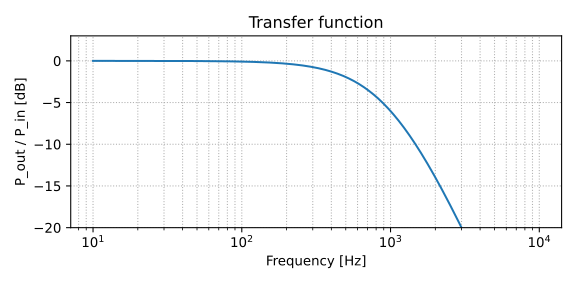
Fig. 67 Transfer function of lowpass filter.#
acoustic#
Because the three basic acoustic analogies[1] can be represented using electric resistance, capacitance and inductance, the acoustic elements discussed here are more complex and use combinations of these smaller components. The pressure source remains similar to the voltage source, this duplicate was made to “simplify” the reading of acoustic circuits.
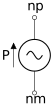
Fig. 68 pressureSource(np, nm, value).#
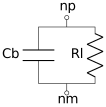
Fig. 69 cavity(np, nm, Vb, eta=1e-5, rho=1.22, c=343). With Vb the cavity volume (in m\(^3\)), eta the loss factor and (rho, c) the air density and speed of sound. The acoustic compliance is represented by Cb, acoustic leaks are defined by Rl. Generally, nm is connected to ground (node 0).#
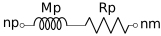
Fig. 70 port(np, nm, Lp, Sp, rho=1.22, c=343). With Lp the port length and rp its radius — both expressed in meters. In that component, Mp and Rp are the acoustic mass and losses, respectively.#
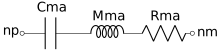
Fig. 71 membrane(np, nm, Cm, Mm, Rm, Sd, rho=1.22, c=343). With Cm, Rm the suspension compliance and losses, and Mm the moving mass. To convert these mechanical data to the acoustic domain, the radiating surface Sd is used. Hence we get the associated components Cma, Mma and Rma.#
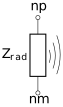
Fig. 72 radiator(np, nm, Sd, rho=1.22, c=343). With Sd the radiating surface. This element computes the complex radiating impedance of a circular piston. It should be possible to approximate the radiation of a rectangular surface using this component without to much error. The negative node nm is usually connected to ground. A radiator can be a loudspeaker as well as a port, vibrating plate, etc.#

Fig. 73 closed_line(np, nm, Lp, Sp, rho=1.22, c=343). With Lp the line length and Sp its cross-sectional. Similarly to .cavity(), nm is connected to ground. The closed line element uses transmission line impedance to get the resonances present within a cavity / line.#
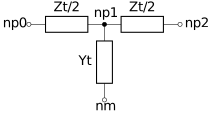
Fig. 74 open_line_T(np0, np1, np2, nm, Lp, Sp, rho=1.22, c=343). With Lp the line length and Sp its cross-sectional area. Similarly to cavity and closed_line, nm is connected to ground. This component uses transmission line analogies as well, with Zt and Yt computed from Lp and Sp.#
The following code demonstrates how to simulate the sound transmission within a duct split by a membrane. Fig. 75 represents the simulated system while the resulting transfer function and membrane volume velocity are shown in Fig. 76 and Fig. 77.
from electroacPy import csc, circuit
from electroacPy import gtb
from numpy import arange, pi

#%% Define study parameters
frequency = arange(10, 10000, 1)
Lp1 = 0.05
Lp2 = 0.1
rp  = 0.01
Sp  = pi*rp**2

#%% Initialize components
Is       = csc.electric.currentSource(1, 0, 1)
line1    = csc.acoustic.open_line_T(1, 2, 3, 0, Lp1, Sp)
membrane = csc.acoustic.membrane(3, 4, 200e-6, 3e-3, 0.12, Sp)
line2    = csc.acoustic.closed_line(4, 0, Lp2, Sp)

#%% Assemble circuit
cir = circuit(frequency)
cir.addComponent(Is, line1, membrane, line2)
cir.run()

#%% Extract potentials and currents
p_out = cir.getPotential(4)
p_in  = cir.getPotential(1)
p_m   = cir.getPotential(3)
H     = p_out/p_in
v_m   = (p_m - p_out) * membrane.Gs

#%% Plot
gtb.plot.FRF(frequency, (p_in, p_out), "dB", legend=("p_in", "p_out"))
gtb.plot.FRF(frequency, H, "dB", ylabel="p_out / p_in")
gtb.plot.FRF(frequency, v_m, "dB", ylabel="Volume velocity [dB]")
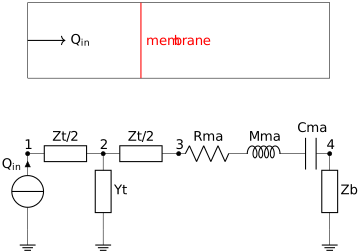
Fig. 75 From top to bottom: system under study and lumped element analogy. Notice, from left to right: current source, T line, membrane and closed line.#
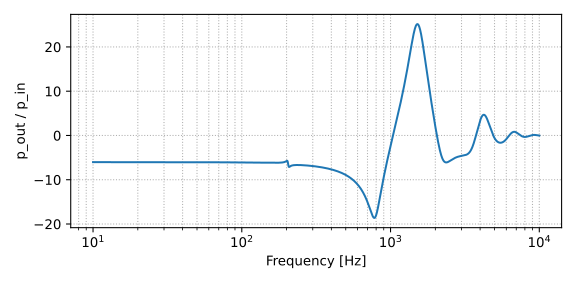
Fig. 76 Sound transmission within the duct.#
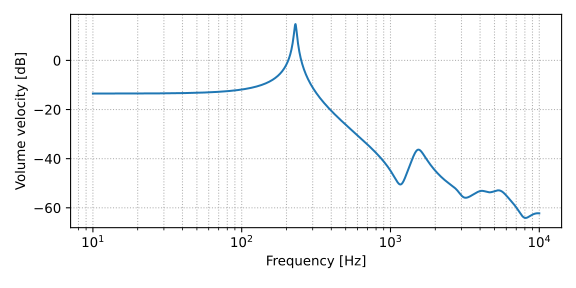
Fig. 77 Volume velocity at membrane.#
Coupler / Controlled sources#
For now, a single controlled source as been implemented. In electro-acoustics, controlled sources are generally used as a way to link two different domains (e.g. electric to mechanic).
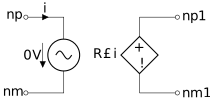
Fig. 78 Current controlled voltage source. CCVS(np, nm, np1, nm1, value=R). Where R is the gain applied on the driven voltage. In the CCVS definition, a zero Volt source is added to read the current of its branch.#
As an example, we simulate a loudspeaker radiating in free-air (see Fig. 79). The resulting impedance and membrane velocity are shown in Fig. 80-Fig. 81 and Fig. 82.
from electroacPy import gtb
import numpy as np
from electroacPy import circuit
from electroacPy import csc

#%% define components
U   = csc.electric.voltageSource(1, 0, 1)
Re  = csc.electric.resistance(1, 2, 6)
Le  = csc.electric.inductance(2, 3, 0.2e-3)
Bli = csc.coupler.CCVS(3, 4, 5, 6, 7.8)
Blv = csc.coupler.CCVS(6, 0, 4, 0, -7.8)
Cms = csc.electric.capacitance(5, 7, 1.35e-3)
Mms = csc.electric.inductance(7, 8, 17.9e-3)
Rms = csc.electric.resistance(8, 0, 0.9)

#%% setup and run circuit
frequency = np.arange(10, 10000, 1)
driver = circuit(frequency)
driver.addComponent(U, Re, Le, Bli, Blv, Cms, Mms, Rms)
driver.run()

#%% extract and plot results
Ze = - driver.getPotential(1) / driver.getFlow(1)
v  = driver.getPotential(8) * Rms.Gs

gtb.plot.FRF(frequency, Ze, "abs", ylabel="Impedance [Ohm]")
gtb.plot.FRF(frequency, Ze, "phase", ylabel="Impedance [rad]")
gtb.plot.FRF(frequency, v*1e3, "abs", ylabel="Velocity [mm/s]")
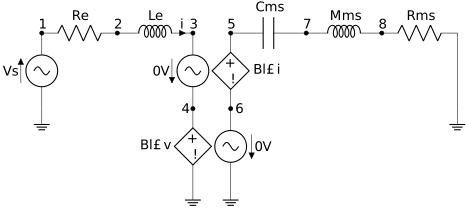
Fig. 79 Lumped network of a loudspeaker driver in free-air.#
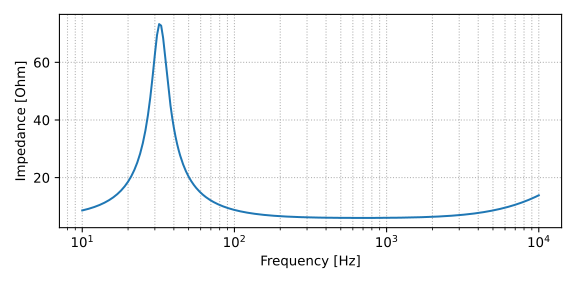
Fig. 80 Free-air impedance, modulus.#

Fig. 81 Free-air impedance, phase.#
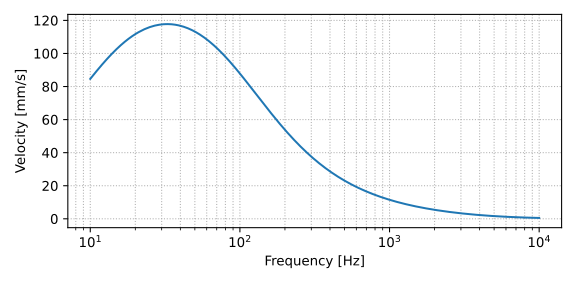
Fig. 82 Free-air velocity.#
Blocks#
Blocks regroup components into sub-circuits, allowing complex structures to be condensed into manageable 2- or 4-port modules for easier manipulation.
electric#
At this stage of development, electric blocks are:
.lowpass_butter(A, B, order, fc, Re),.highpass_butter(A, B, order, fc, Re).
Both are built using the definitions of Butterworth high- and low-pass filters from [BM19].
from electroacPy import gtb
from numpy import arange
from electroacPy import csc, csb, circuit

frequency = arange(10, 10e3, 1)
cir = circuit(frequency)

#%% Source + crossovers
Vs  = csc.electric.voltageSource(1, 0, 2.83)
lp1 = csb.electric.lowpass_butter(1, 2, order=3, fc=300, Re=8)
hp1 = csb.electric.highpass_butter(1, 3, order=3, fc=300, Re=4)

#%% Electric load
Re8 = csc.electric.resistance(2, 0, 8)
Re4 = csc.electric.resistance(3, 0, 4)

#%% setup and run
cir.addBlock(lp1, hp1)
cir.addComponent(Vs, Re8, Re4)
cir.run()

#%% extract FRF
H_lp = cir.getPotential(2) / cir.getPotential(1)
H_hp = cir.getPotential(3) / cir.getPotential(1)

gtb.plot.FRF(frequency, (H_lp, H_hp, H_lp+H_hp), "dB",
             legend=("H_lp", "H_hp", "sum"),
             ylim=(-20, 3))
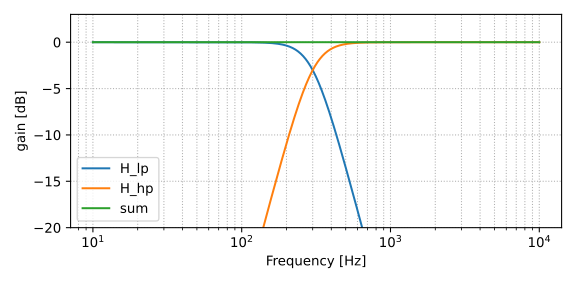
Fig. 83 Frequency-response function of a 3rd order crossover stage.#
electrodynamic#
Electro-dynamic blocks connect electrical to mechanical and/or acoustical domain. For now, only the electro-acoustic driver (EAD) block exists. It essentially regroup the network of Fig. 79 with two additional ports in the acoustical domain: front and back load.
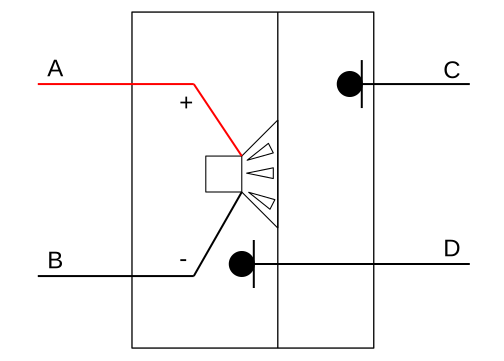
Fig. 84 EAD(A, B, C, D, Le, …, Sd, v_probe:optional). Representative 4-port model of the electro-acoustic-driver block. With A and B being the positive and negative electrical connections; C and D the front and back acoustic load. If a str (text) is passed to the v_probe argument, cone velocity can be extracted using circuit.getFlow(your_str).#
In the next code, we compare different wiring combination of drive units (single speaker, 2-parallel, 2-series). Here, we consider equivalent input power across all three configuration.
from electroacPy import gtb
from electroacPy import csc, csb, circuit
from numpy import arange, sqrt

#%% Initialization of circuits
frequency = arange(10, 10e3, 1)
single   = circuit(frequency)
parallel = circuit(frequency)
series   = circuit(frequency)

#%% driver parameters
Re  = 6
Le  = 0.2e-3
Cms = 1.35e-3
Mms = 17.9e-3
Rms = 0.9
Bl  = 7.8
Sd  = 158e-4

#%% Input voltage to get 1W of power
U_single   = sqrt(Re)
U_parallel = sqrt(Re/2)
U_series   = sqrt(Re*2)

#%% 1. single driver
Vs    = csc.electric.voltageSource(1, 0, U_single)
ead_1 = csb.electrodynamic.EAD(1, 0, 2, 0, Le, Re, Cms, Mms, Rms, Bl, Sd, v_probe="v")
rad_1 = csc.acoustic.radiator(2, 0, Sd)
single.addBlock(ead_1)
single.addComponent(Vs, rad_1)

#%% 2. parallel drivers
Vs    = csc.electric.voltageSource(1, 0, U_parallel)
ead_1 = csb.electrodynamic.EAD(1, 0, 2, 0, Le, Re, Cms, Mms, Rms, Bl, Sd, v_probe="v")
rad_1 = csc.acoustic.radiator(2, 0, Sd)
ead_2 = csb.electrodynamic.EAD(1, 0, 3, 0, Le, Re, Cms, Mms, Rms, Bl, Sd)
rad_2 = csc.acoustic.radiator(3, 0, Sd)
parallel.addBlock(ead_1, ead_2)
parallel.addComponent(Vs, rad_1, rad_2)

#%% 3. Series drivers
Vs    = csc.electric.voltageSource(1, 0, U_series)
ead_1 = csb.electrodynamic.EAD(1, 2, 3, 0, Le, Re, Cms, Mms, Rms, Bl, Sd, v_probe="v")
rad_1 = csc.acoustic.radiator(3, 0, Sd)
ead_2 = csb.electrodynamic.EAD(2, 0, 4, 0, Le, Re, Cms, Mms, Rms, Bl, Sd)
rad_2 = csc.acoustic.radiator(4, 0, Sd)
series.addBlock(ead_1, ead_2)
series.addComponent(Vs, rad_1, rad_2)

#%% run simulations
single.run()
parallel.run()
series.run()

#%% plot driver velocities
Z_single   = -single.getPotential(1) / single.getFlow(1)
Z_parallel = -parallel.getPotential(1) / parallel.getFlow(1)
Z_series   = -series.getPotential(1) / series.getFlow(1)

v_single   = single.getFlow("v")   * 1e3
v_parallel = parallel.getFlow("v") * 1e3
v_series   = series.getFlow("v")   * 1e3

gtb.plot.FRF(frequency, (Z_single, Z_parallel, Z_series), "abs",
             legend=("single", "parallel", "series"),
             ylabel="Impedance [Ohm]")

gtb.plot.FRF(frequency, (v_single, v_parallel, v_series), "abs",
             legend=("single", "parallel", "series"),
             ylabel="Velocity [mm/s]")
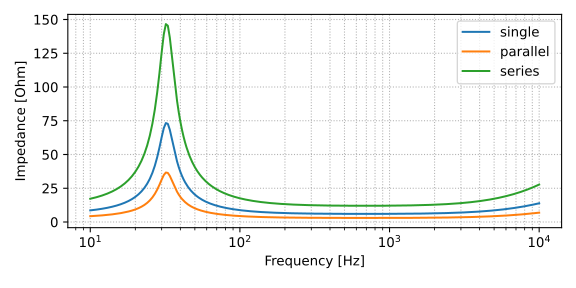
Fig. 85 Impedance comparison between single, parallel and series configuration.#
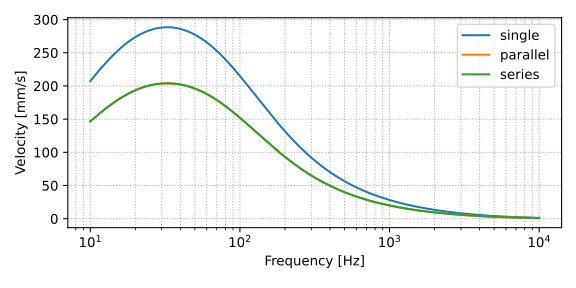
Fig. 86 Velocity comparison between single, parallel and series configuration.#
Application example#
Here we take the studio monitor from the Loudspeaker System part, and re-create the passive crossover done in VituixCAD. Both electric and acoustic domain are modeled, the coupling handled with EAD blocks, as explained above.
import numpy as np
import electroacPy as ep
from electroacPy import gtb
from electroacPy import csc, csb
from electroacPy import circuit

#%% initialize component to avoid long declarations
inductance  = csc.electric.inductance
resistance  = csc.electric.resistance
capacitance = csc.electric.capacitance
EAD         = csb.electrodynamic.EADImport
cavity      = csc.acoustic.cavity
port        = csc.acoustic.port
radiator    = csc.acoustic.radiator

#%% load radiation data (without post-processing)
system = ep.load("06_acoustic_radiation_refined")
frequency = system.frequency

#%% get LPM data
lpm_woofer   = "../technical_data/SB SB34NRXL75-8.txt"
lpm_midrange = "../technical_data/SB MR16PNW-8.txt"
lpm_tweeter  = "../technical_data/TW29RN-B.txt"

#%% create circuit from VituixCAD network
sV = csc.electric.voltageSource(1, 0, 2.83)

# LF filter
L1 = inductance(1, 2, 3.3e-3)
C1 = capacitance(2, 3, 33e-6)
R1 = resistance(3, 0, 6.8)

# LF driver + acoustic
LF      = EAD(2, 0, "A", "B", lpm_woofer, "v_lf")
rad_lf  = radiator("A", 0, LF.Sd)
box_lf  = cavity("B", 0, 40e-3)
prt     = port("B", "C", 35e-2, 5e-2)
rad_prt = radiator("C", 0, 2*np.pi*(5e-2)**2)

# MF filter
C2 = capacitance(1, 4, 43e-6)
L2 = inductance(4, 5, 560e-6)
L3 = inductance(5, 0, 6.6e-3)
C3 = capacitance(5, 0, 3.66e-6)
L4 = inductance(5, 6, 6.8e-3)
C4 = capacitance(6, 7, 390e-6)
R2 = resistance(7, 0, 5.6)
C5 = capacitance(5, 8, 3.3e-6)
R3 = resistance(8, 0, 6.8)
R4 = resistance(5, 9, 1.28)
R5 = resistance(9, 0, 24)

# MF driver + acoustic
MF     = EAD(0, 9, "D", "E", lpm_midrange, "v_mf")
rad_mf = radiator("D", 0, MF.Sd)
box_mf = cavity("E", 0, 5.1e-3)

# HF filter
C6 = capacitance(1, 10, 14.4e-6)
C7 = capacitance(10, 11, 126e-6)
L5 = inductance(11, 12, 0.4e-3)
R6 = resistance(12, 0, 3.3)
R7 = resistance(10, 13, 0.6)
R8 = resistance(13, 0, 11.5)

# HF driver + acoustic
HF = EAD(13, 0, "F", 0, lpm_tweeter, "v_hf")
rad_hf = radiator("F", 0, HF.Sd)

#%% Assemble circuit
# frequency = gtb.freqop.freq_log10(10, 10e3, 125)
network = circuit(frequency)
network.addComponent(L1, L2, L3, L4, L5,
                     C1, C2, C3, C4, C5, C6, C7,
                     R1, R2, R3, R4, R5, R6, R7, R8,
                     sV,
                     rad_lf, box_lf, prt, rad_prt,
                     rad_mf, box_mf,
                     rad_hf)
network.addBlock(LF, MF, HF)
network.run()

# filter transfer function (to be used in a filter network)
H_lf = network.getPotential(2) / network.getPotential(1)
H_mf = network.getPotential(9) / network.getPotential(1)
H_hf = network.getPotential(13) / network.getPotential(1)

#%% add transfer functions to network
system.filter_network("LF_xover", ref2bem=[1, 2], ref2study="free-field")
system.filter_addTransferFunction("LF_xover", "hlf", H_lf)

system.filter_network("MF_xover", ref2bem=3, ref2study="free-field")
system.filter_addTransferFunction("MF_xover", "hmf", -H_mf)  # "-" to reverse phase

system.filter_network("HF_xover", ref2bem=4, ref2study="free-field")
system.filter_addTransferFunction("HF_xover", "hhf", H_hf)
This code gives horizontal and vertical directivity responses as seen in Fig. 87 and Fig. 88. The transfer functions of the crossover network is shown in Fig. 89
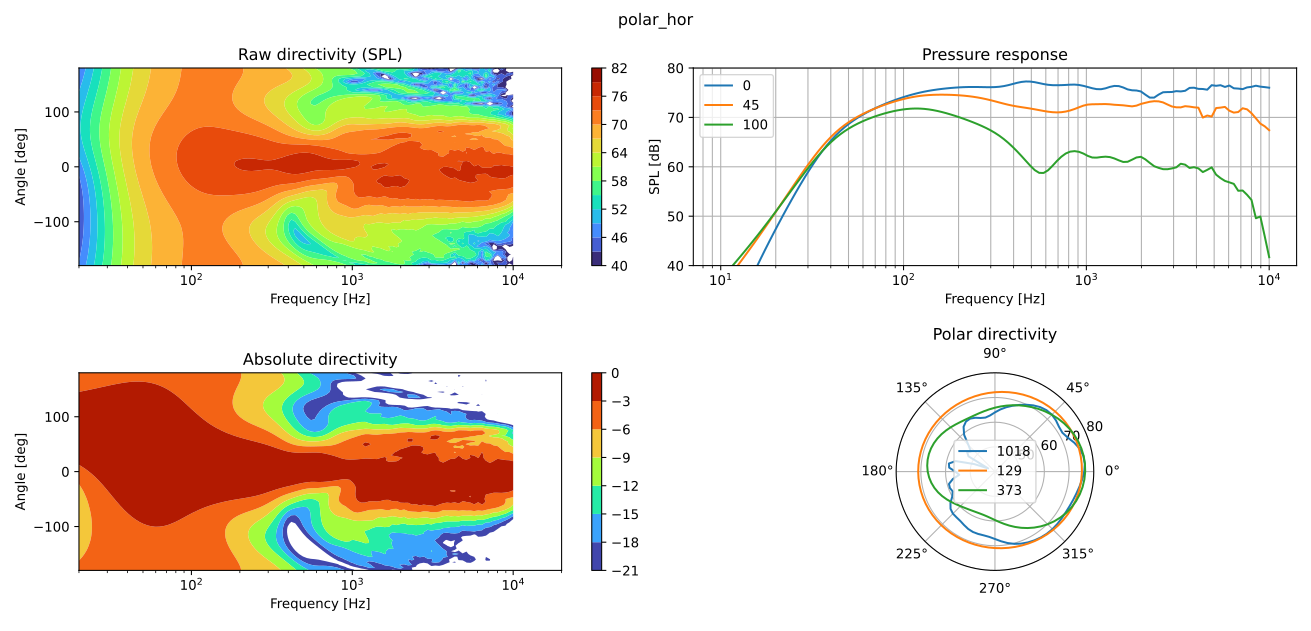
Fig. 87 Horizontal directivity with passive crossovers.#
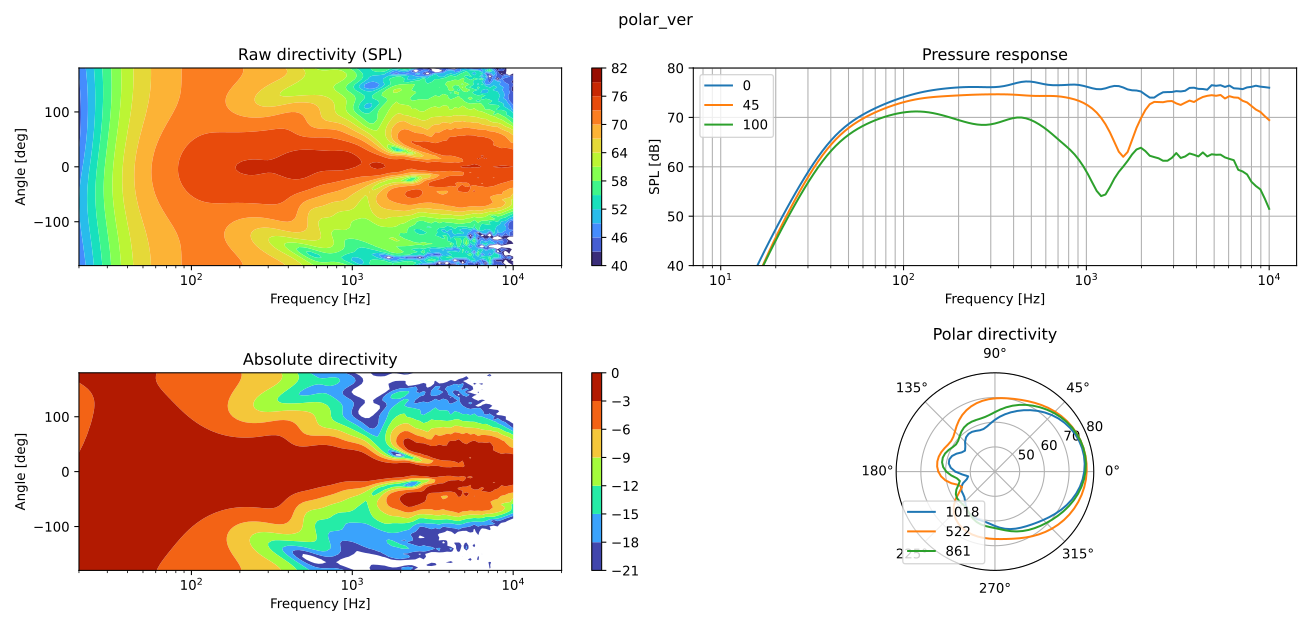
Fig. 88 Vertical directivity with passive crossovers.#
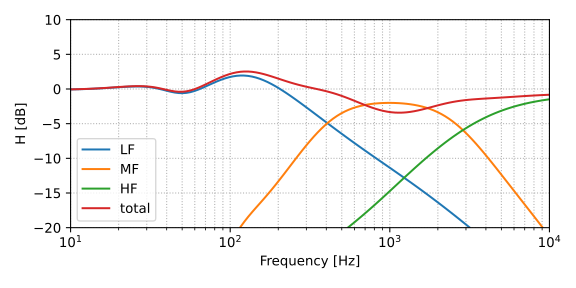
Fig. 89 Lowpass, bandpass, highpass and total response of the passive filter network.#